
PCI Compliance forms - Sola
To maintain a secure payment environment, all merchants are required to validate their PCI DSS Compliance after receiving payment processing approval from Sola.
Watch for Your Credentials
Once your merchant underwriting is approved by Sola, you will receive an automated email to complete your PCI Compliance forms. The email will come from
Note: Please keep an eye on your inbox (and spam folder) for this email. The email addresses for [email protected] and [email protected] are both safe and authorized to contact you; they provide the secure portal and login credentials you need to complete your validation.
Step-by-step PCI Compliance Guide
Follow these exact steps to ensure your account completes PCI DSS compliance validation and remains in good standing:
Visit the PCI Compliance Website
Open your web browser and go to https://www.pciapply.com/sola
Your login credentials will be provided to you via email after your merchant account has been approved by sola. Look for this section in the email to find your credentials.
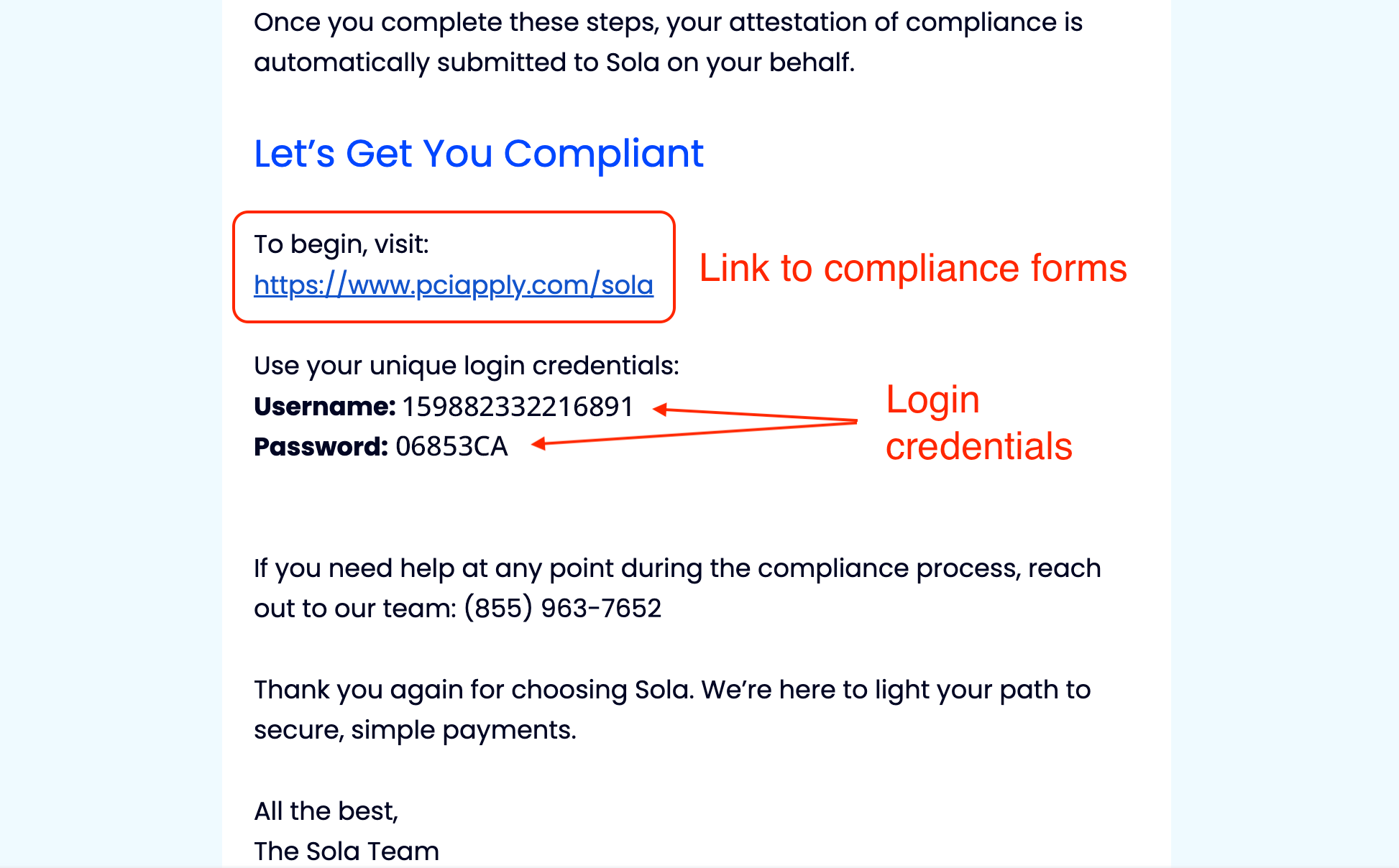
Log in
Your login credentials may take 1-2 business days to aggregate across the PCI provider's system. If they don't work right away, try again tomorrow.
Review / update your profile
Enter your email address to be notified of future PCI requirements
Update your First and Last Name (if necessary)
Update your password and create a security question/answer.
Click "Get Started"
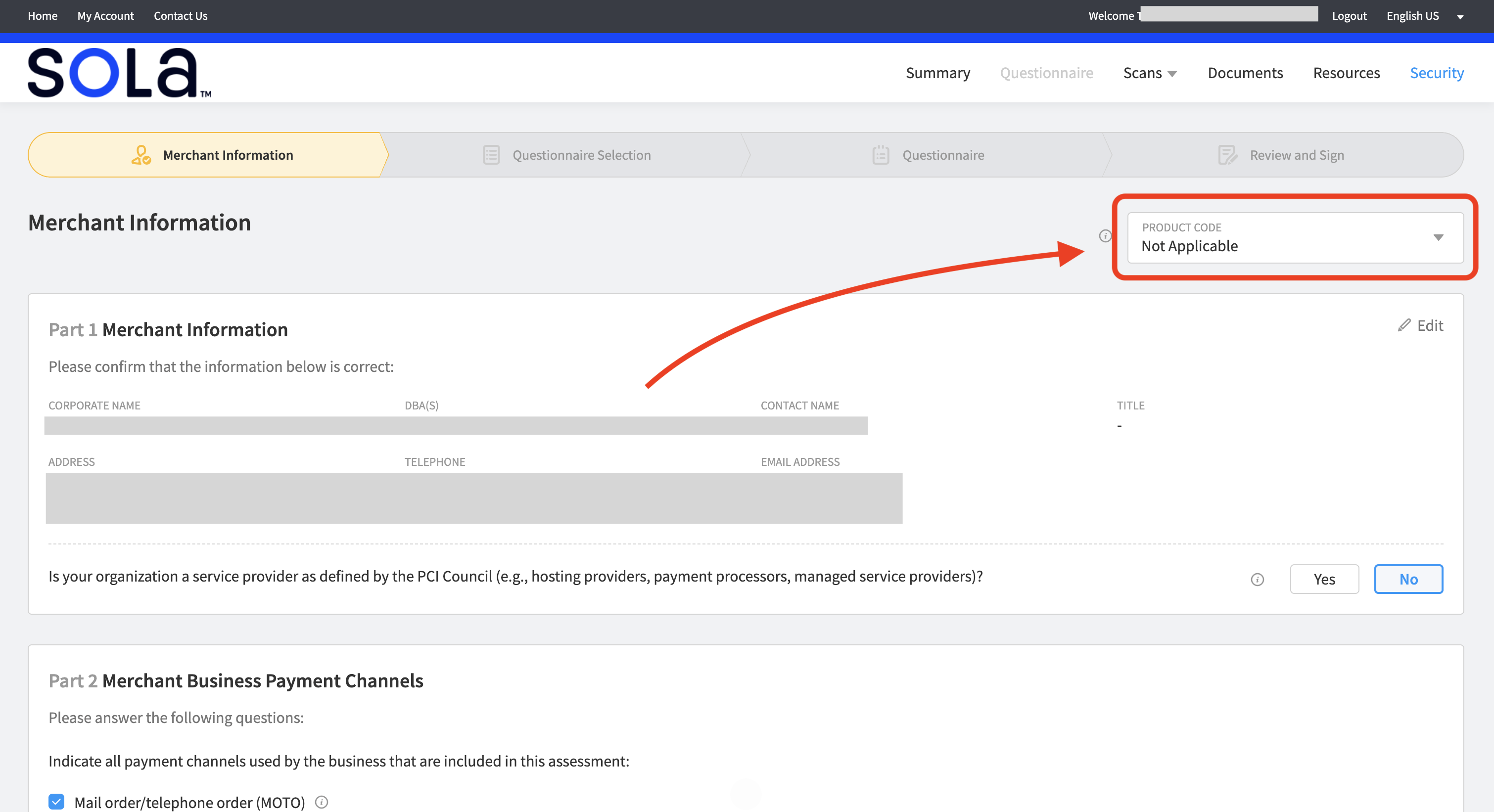
Select your "Product"
In the upper-right corner, locate the Product Code dropdown. Click on it and select "Mallow LLC" from the dropdown menu.
Accept the Agreement
Check the box to indicate that you accept the agreement, then click Save and Continue.
Start the Questionnaire
Click Start Questionnaire in the bottom-right corner
At the end of each section, check the attestation box, then click Save and Continue
Repeat this process for each section. You will complete this step approximately 10 times throughout the questionnaire.
Note: Seeing this attestation multiple times is normal and expected. Simply complete it for each section of the questionnaire.
Questionnaire Summary
Once you have completed each section of the Questionnaire, you will be taken to the summary page. Click "Continue" in the bottom-right corner.
Review and Sign
Once you reach the Review and Sign page:
Scroll directly to Part 3B. Skip all sections above.
Enter your eSignature
Click Submit
PCI Documents
After clicking Submit, you will be taken to the PCI Document page:
Your PCI Compliance Questionnaire has been successfully completed and you may log out.
You will receive a confirmation email from [email protected] confirming your PCI compliance submission
Please ensure that email from [email protected] are not sent to your spam or junk folders. If necessary, add this email address to your contact list to ensure you receive future PCI Compliance notifications.
Your PCI compliance is valid for one (1) year from the date of completion.
~11 months after completing your compliance, you will receive a reminder email to renew PCI Compliance before it expires.
Need Assistance?
If you need assistance completing your PCI Compliance Questionnaire, you may contact our Sola PCI Support Representative at (844) 227-3566, Ext 110.