
Connect Mallow and QBO
To set up the Mallow x QuickBooks Online integration, follow the steps below.
1
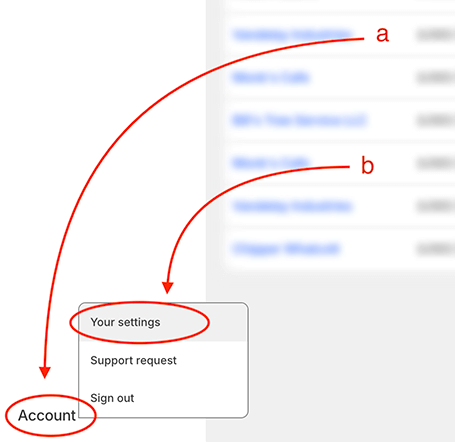
Go to the Settings menu
From your Mallow portal, click on the Account tab at the bottom-left corner of the page (a). On mobile, tap the Account gear icon in the bottom footer.
Click on Settings from the drop down menu (b).
2
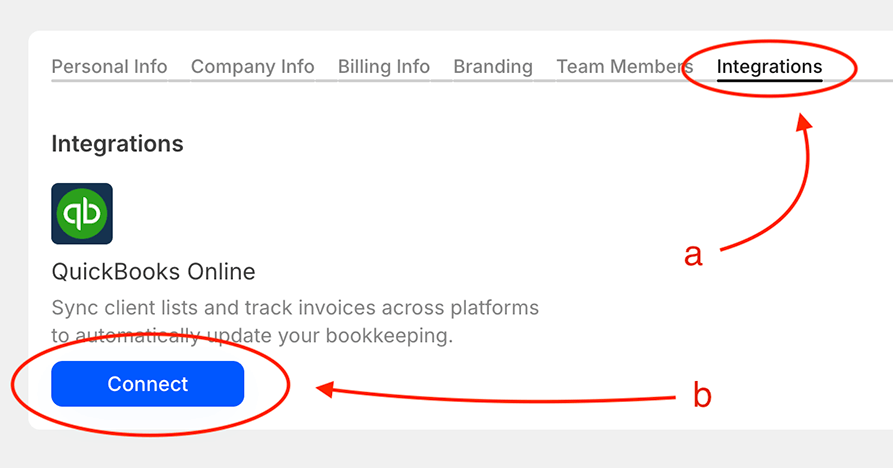
Connect the Integration
Find the Integrations tab (a).
Select the Connect button for QuickBooks Online (b).
Proceed with the on-screen instructions until the integration is complete.
Only admins can connect or disconnect integrations. Managers and viewers can view the Integrations tab but cannot make changes.
Once connected, learn how Mallow syncs invoices and payments with QuickBooks Online.
Was this helpful?
Was this helpful?